
BuildScope for plumbers
Turn today's site notes into the scope before tonight.
Talk through what you found while the job is still fresh. BuildScope turns your rough notes into a structured scope you review, price and send.
7 days free · Up to 10 scopes · No credit card
 Now on iPhone and iPad
Sound familiar?
Three inspections today. Three scopes waiting tonight.
On site
- Photos
- Quick notes
- A couple of measurements
- The rest said out loud to the client
Later
- Open the laptop
- Find the photos
- Read the notes back
- Try to remember the job
- Write the whole thing up properly
You know how to scope a plumbing job. The problem is that everything you found on site has to be rebuilt later, from photos, half a note and memory. BuildScope shortens that gap to the time it takes to talk it through.
Rough in, clean out
Seven words on site. A scope the client can sign.
What you actually write on site
- bathroom leak
- remove vanity
- open wall
- replace pipe
- patch wall
- plumber + painter
- check moisture
What the client should receive
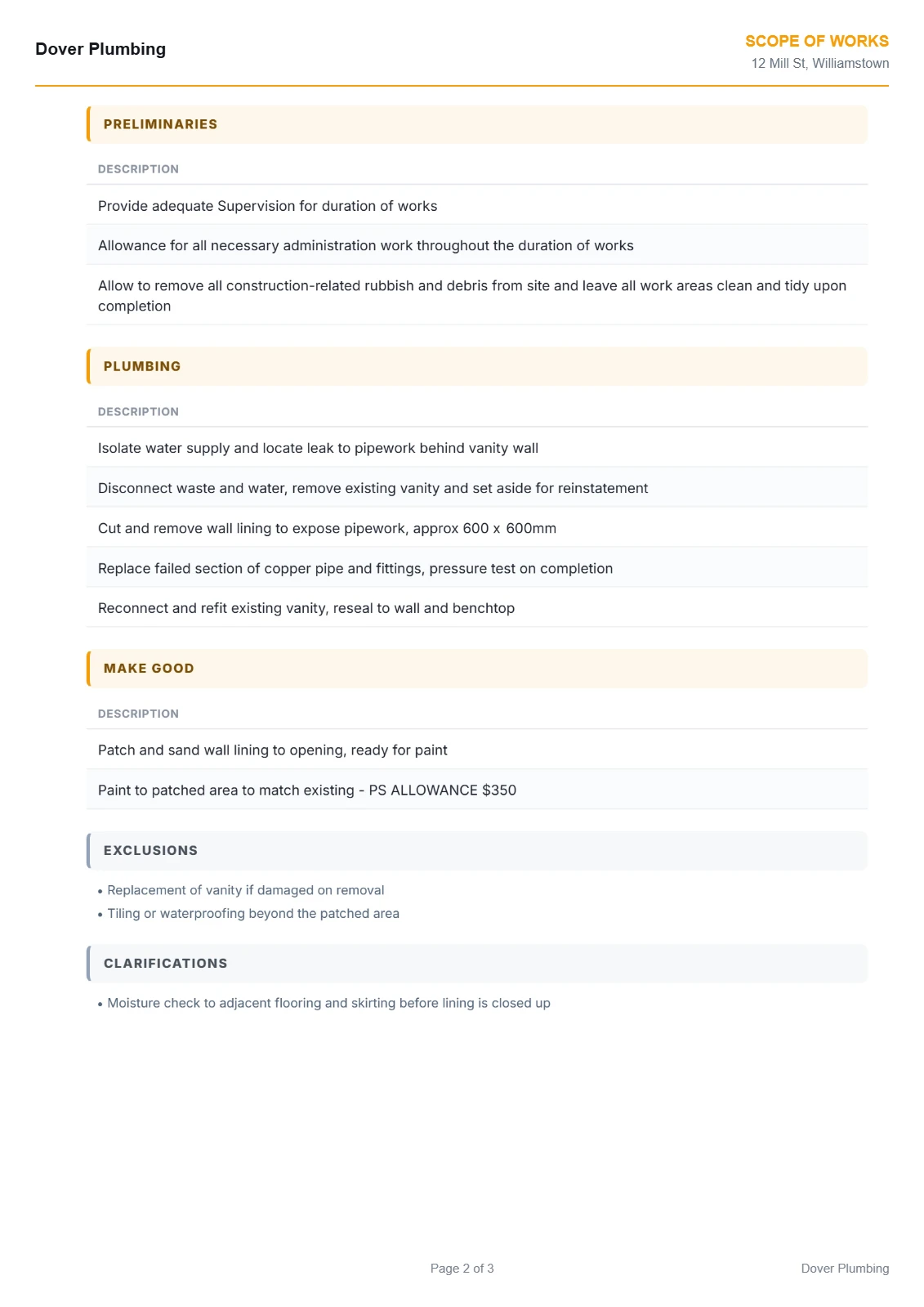
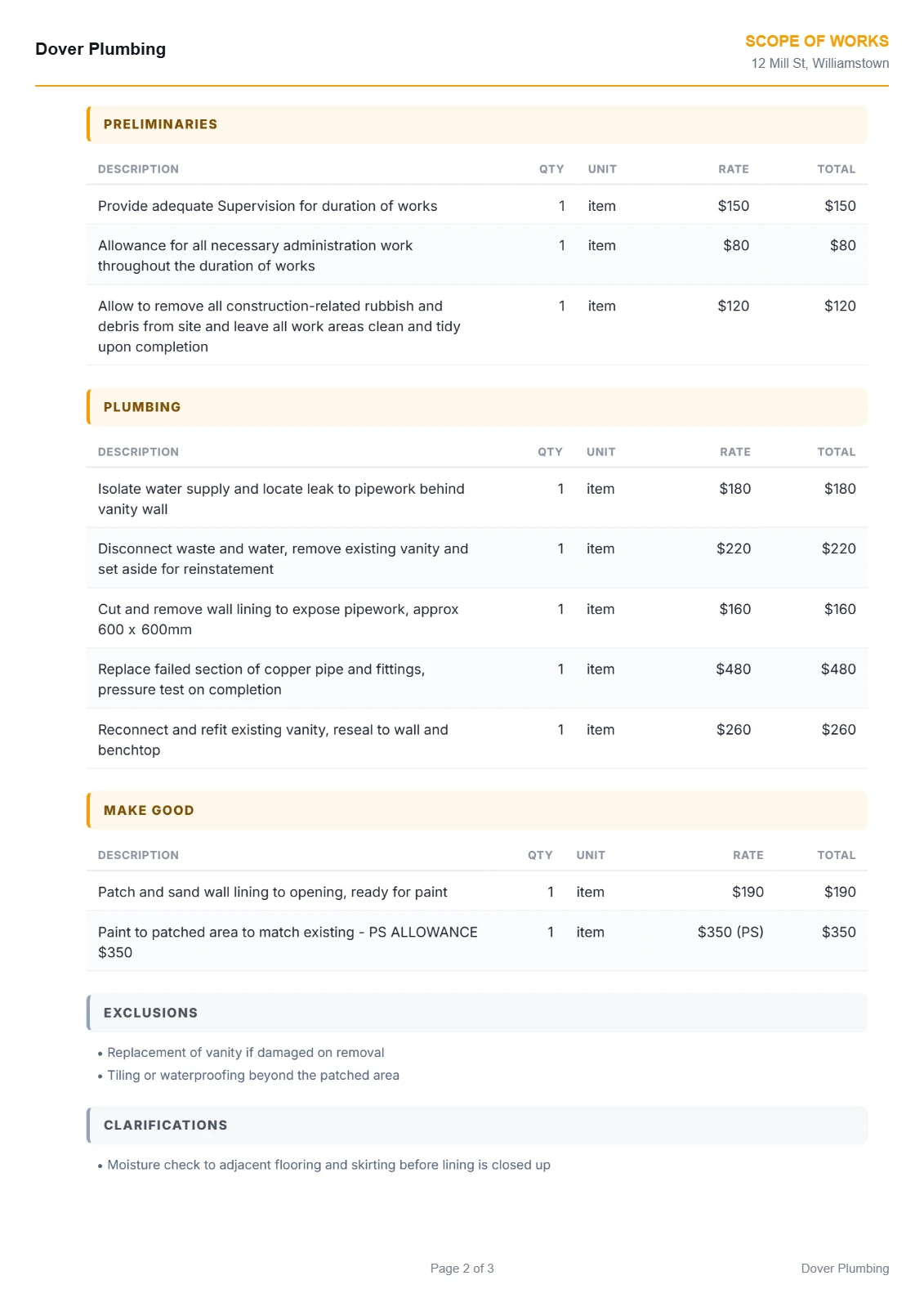
Example only. Your scope carries your wording, your rates and your exclusions, and you read every line before it goes out.
Nothing slips through
What BuildScope checks on every plumber job.
Industry-specific inclusions, prompted before you send the scope, not discovered after you win it.
- Hot water
- Stormwater
- Drainage
- Fixtures
- Testing
- Certification
The scope itself
What goes into a plumber scope of works.
Plumbing scopes get argued over where the work is invisible: drainage runs, what is behind the wall, and which certificates are included.
Line items that belong on it
- Hot water service supply, install or relocation
- Stormwater and drainage works including connections
- Rough-in to wet areas for fixtures and tapware
- Fixture and tapware install and fit-off
- Testing, compliance certificates and handover
What gets left off
- Compliance certificates. Required, chargeable, and routinely left off the quote.
- Excavation and reinstatement for drainage. Digging is one job, putting the surface back is another.
- Fixtures the client has not chosen yet. Without a PC allowance you are carrying their showroom taste.
Worth excluding in writing
- Supply of client-selected fixtures and tapware
- Rectification of existing pipework beyond the works area
- Making good to finished surfaces after access
Where BuildScope fits
You run the job. BuildScope does the paperwork in the middle.
Plumbers know how to walk a job and price it. BuildScope takes the paperwork between the site meeting and the quote going out.
- 01 Enquiry lands Client rings or emails. You book a time to look at the job.
- 02 Site meeting You walk the job, measure up and take your photos.
- 03 Brain dump Talk or type the job into BuildScope, on site or in the ute.
- 04 The questions BuildScope asks what a tired estimator forgets: access, protection, rubbish, patching.
- 05 Scope of Works A full scope, trade by trade, preliminaries first, PC and PS kept separate.
- 06 Price and export Check quantities and pricing, apply your margin and GST, export the client-ready PDF.
- 07 Send and sign You send the PDF. The acceptance page is already in there for the client to sign.
- 08 Job runs Book the trades and get moving. The scope is your checklist and your variation defence.
BuildScope covers steps 03 to 06. You do the trade work, it does the paperwork.
Plumbers already running accounting software? No worries.
Build the scope in BuildScope the way you always do, then move the job into your accounting or job management software as a draft, with the PDF attached. Nothing reaches your client until you send it.
How it works
Three steps from site visit to client-ready scope.
Describe the job
Walk the services on site and note what is being replaced, what is being relocated, and what you cannot see yet.
Answer the questions that matter
BuildScope asks the plumbing questions: fixture counts, drainage runs and falls, hot water type and location, and which certificates apply.
Review and send
Check the rough-in and fit-off split, keep fixtures as PC allowances where the client is choosing, and export.
Pricing
Get those hours back for $99 a month.
Per user, everything included. Try it free for 7 days, your first 10 scopes are on us. No credit card.
BuildScope
Everything included, priced per user.
$99per user / month
Or pay $990 a year and get 2 months free.
Start free
No credit card required.
Prices in AUD, excluding GST. Unlimited scopes after trial. No feature gates. Cancel anytime.
Everything included
- Unlimited scopes after your trial
- Voice notes and photo capture
- Professional scopes and quotes
- Branded PDF exports
- Shared job history across your team
- iPhone, iPad, Android and desktop
- No feature gates
- Export and hand off to the software you already use
FAQ
Questions plumbers ask before signing up.
Does BuildScope decide what plumbing work I need to quote?
What if BuildScope gets something wrong?
I already use job management software. Why would I need BuildScope?
Can't I just use ChatGPT?
Do I have to type everything?
Can I edit the scope?
Can I add my pricing?
Can I export it as a PDF?
Is there a contract?
What does the free trial include?
Is there an app?
What should a plumbing scope of works include?
How should plumbers scope drainage work?
Does BuildScope work with the software I already use?
Also built for the trades you work with.
Try BuildScope on the next plumbing job you inspect.
Don't change how you inspect the job. Just change what happens to the information afterwards.
7 days free · Up to 10 scopes · No credit card